
As of version 3.1, PicArrange also includes a fast duplicate search function. The threshold value at which images are classified as duplicates can be set.
- Welcome to MicrostockGroup.

This section allows you to view all posts made by this member. Note that you can only see posts made in areas you currently have access to.
Pages1
#2
Software / PicArrange 3.0: Find images with words on your Mac
July 31, 2024, 11:31
We are announcing an update to our free PicArrange app that now includes text-based image search and improved similarity search for Mac.
Download it from the App Store:
https://apps.apple.com/app/picarrange/id1530678223?mt=12
Here is a short video: https://www.youtube.com/watch?v=7nsdQfjcSt4
We welcome your feedback.

Download it from the App Store:
https://apps.apple.com/app/picarrange/id1530678223?mt=12
Here is a short video: https://www.youtube.com/watch?v=7nsdQfjcSt4
We welcome your feedback.
#3
Software - General / Visual Computing Group releases free image search and sorting app for Mac
April 07, 2021, 09:52
The Visual Computing research group at HTW Berlin has released an update of its image search and exploration app. PicArrange 2.0 allows to view images from multiple folders. Opposed to Finder, additional sorting by content and color is possible. Large quantities of images can be viewed much faster. In addition to the visual image sorting mode, the app also offers a visual search that can be used to find images similar to one or more sample images.
There are many new features in the new version: Better image analysis, video support, new display modes, ...
Details can be found in the AppStore:
https://apps.apple.com/app/picarrange/id1530678223
A tutorial on how to use PicArrange can be found here:
https://visual-computing.com/project/picarrange/
All image analysis is done locally. No data is transfered to an external server.
Feedback is welcome.
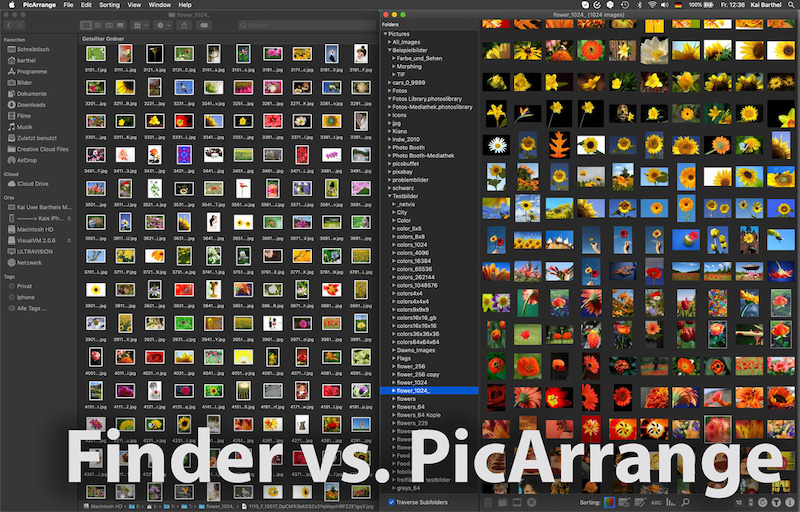
There are many new features in the new version: Better image analysis, video support, new display modes, ...
Details can be found in the AppStore:
https://apps.apple.com/app/picarrange/id1530678223
A tutorial on how to use PicArrange can be found here:
https://visual-computing.com/project/picarrange/
All image analysis is done locally. No data is transfered to an external server.
Feedback is welcome.
#4
General Photography Discussion / Re: Visual browsing and similarity search for local photos on the iPhone/iPad
August 17, 2018, 14:43
The visualization and search is only for the photos on the device. I think it might be helpful for finding a particular image.
On the map overview you look for an image that roughly corresponds to the one you are looking for and from the single view of this image you can then start the similarity search within all images on the iPhone or iPad. In my opinion there is no other app like this for local photos yet.
On the map overview you look for an image that roughly corresponds to the one you are looking for and from the single view of this image you can then start the similarity search within all images on the iPhone or iPad. In my opinion there is no other app like this for local photos yet.
#5
General Photography Discussion / Visual browsing and similarity search for local photos on the iPhone/iPad
August 17, 2018, 14:15
We are a visual computing research group of HTW Berlin Germany (University of applied sciences).
Some of you might know Imagesorter, pixolu, our previous app visolu or www.picsbuffet.com
I wanted to let you know about a free visual image browser app that we have developed for the iPhone/iPad.
As with mapping systems you can easily explore huge sets of personal photos or search for similar photos.
https://itunes.apple.com/app/kiano/id1413833786?mt=8
It would be great if you could let other people know about the ,,Kiano" app or even write about it if you have a blog. I think it might be exciting for your readers, as there are no other comparable apps yet. At the moment there are no non-german sites that have reported about it, so the topic is still very new.
Best regards,
Kai Barthel
Some of you might know Imagesorter, pixolu, our previous app visolu or www.picsbuffet.com
I wanted to let you know about a free visual image browser app that we have developed for the iPhone/iPad.
As with mapping systems you can easily explore huge sets of personal photos or search for similar photos.
https://itunes.apple.com/app/kiano/id1413833786?mt=8
It would be great if you could let other people know about the ,,Kiano" app or even write about it if you have a blog. I think it might be exciting for your readers, as there are no other comparable apps yet. At the moment there are no non-german sites that have reported about it, so the topic is still very new.
Best regards,
Kai Barthel
#6
General Stock Discussion / Re: Do you enjoy adding meta data?
January 21, 2016, 16:24
I have mentioned akiwi before. But we have recently released a new version of our semi-automatic keywording tool: http://www.akiwi.eu/
Usually only a few clicks are needed to get a good starting set of keywords for an unknown image.
Usually only a few clicks are needed to get a good starting set of keywords for an unknown image.
#7
Software / Re: visual image browsing
June 29, 2015, 21:02
Thank you for your feedback, I definitely have to make a longer video explaining things better. The basic idea was to try to arrange a huge set of millions of images in such a way that similar images are mapped close to each other in order to allow visual browsing similar to Google maps. The problem however is that the relationships between all images are very complex and cannot be projected perfectly onto a 2D map. Nevertheless, we have tried this. In many areas we achieved to have nice smooth transitions going from one topic to another, however sometimes there are hard borders between unrelated images. We are working on an extended approach to fix this problem by using a graph of images instead of a 2D map.
In the current version the user may navigate through multiple image layers by zooming and dragging. Zooming in (or out) shows more (or less) similar images from lower (or higher) levels. Dragging the view shows related images from the same level. After a keyword search the user is automatically directed to a region with suiting results. Other interesting areas are indicated by highlighted color regions in the heatmap on the upper left. Below the heatmap images from the 5 most suiting regions are shown. Clicking such an image will take the viewport to that area.
For he moment the pyramid on the lower right only shows the position and level of the actual viewport, it cannot be used to navigate.
In the current version the user may navigate through multiple image layers by zooming and dragging. Zooming in (or out) shows more (or less) similar images from lower (or higher) levels. Dragging the view shows related images from the same level. After a keyword search the user is automatically directed to a region with suiting results. Other interesting areas are indicated by highlighted color regions in the heatmap on the upper left. Below the heatmap images from the 5 most suiting regions are shown. Clicking such an image will take the viewport to that area.
For he moment the pyramid on the lower right only shows the position and level of the actual viewport, it cannot be used to navigate.

#9
Software / visual image browsing
June 26, 2015, 11:00
I wanted to let you know about a demo of a visual image browser that we have developed at HTW Berlin. As with Google Maps you can easily explore huge sets of images or search for particular images. Use your mouse to zoom and drag the map. Click an image to enlarge it.
www.picsbuffet.com
Any comments are welcome. Please share picsbuffet if you like it.
This version uses over 1 million images from fotolia. Currently only the Chrome and Opera browser are supported. Future versions will support more and other images and other browsers as well.
www.picsbuffet.com
Any comments are welcome. Please share picsbuffet if you like it.
This version uses over 1 million images from fotolia. Currently only the Chrome and Opera browser are supported. Future versions will support more and other images and other browsers as well.
#10
Newbie Discussion / Re: New image search fusing visual and keyword search
November 13, 2013, 22:33Quote from: Jo Ann Snover on October 14, 2013, 21:27
Interesting - I had fun dong a few searches.
Couple of thoughts.
I like it that you keep the current "seed" image up at the top left, but I would like to be able to see a rack of past seeds for the current search term - in case I didn't like my current branch and wanted to go back a bit. Currently the image is just visual and I'd like it to be a link to prior search.
Even having read Sean's comment about the slider in Find similar, I didn't understand what was going on. I think that dropping the percentages and having an arrow with Keywords and Visual on either side (along with the color change which is a good visual clue).
Several times I clicked on the image I liked and it did nothing - how about making that default to a find similar with a 50/50 keyword/visual split?
We have implemented some of your proposals. Have a look at
http://fusion.pixolution.de/
#11
General Stock Discussion / Re: Finding images with similar content that also look similar (cmts please)
October 21, 2013, 14:12Quote from: michaeldb on October 20, 2013, 03:18
The software was uncannily effective at finding similar images. I was impressed.
I wonder how it would work on, say, Amazon. After reading a good novel, let's say historical fiction, I often wish I could find more like it, but sometimes keywords don't work too well. If Amazon let me search for books with covers like the one I just read, I would try it to see what it came up with.
BTW one of your pages says "Visual Arrangement...Inspect large image sets at a time without loosing overview."
I suspect you mean 'losing' instead of 'loosing'.
Thank you for the nice feedback (and the correction
 ).
).In the current demo we only use keyword & visual information to retrieve similar images.
At http://www.picslikethat.com/ (another university project) we have also used the click pathes from previous searches to learn relationships between images. The problem is that you need many users to learn enough relationships. This kind of search approach could also be used for other products.
#12
General Stock Discussion / Re: Finding images with similar content that also look similar (cmts please)
October 19, 2013, 12:54Quote from: ShadySue on October 18, 2013, 10:51I did comment on this in a previous post.
You may not have realised that this forum is used mostly by people who are selling content, though some also buy content. So this may not be the best marketplace for your product.
But just one additional question: Does anybody know what might be the "right market place" for us?
I did not find any group that deals with the problem how image stock systems should be designed or want kind of software the agencies are using.
Thank you.
#13
General Stock Discussion / Re: Finding images with similar content that also look similar (cmts please)
October 18, 2013, 12:52Quote from: Kerioak~Christine on October 18, 2013, 12:21We are using 22 million thumbnails from fotolia to demonstrate the search possibilities. If you move your mouse over an image then you can click "Show Details" to see a larger version. There is also a link to the fotolia site with further information about the image.
I have just looked at your demo version - I am curious as to where are the images coming from as there are a lot of mine there, many of which have not been available online for some time, nor were they all licenced.
#14
General Stock Discussion / Re: Finding images with similar content that also look similar (cmts please)
October 18, 2013, 10:59Quote from: ShadySue on October 18, 2013, 10:51
You may not have realised that this forum is used mostly by people who are selling content, though some also buy content. So this may not be the best marketplace for your product.
You are definitely right, but we need to know how people do search for images. And therefore feedback to new image search approaches is quite important for us.
Have you ever tried to find your own images among millions of other images without using the photographer's name?
#15
General Stock Discussion / Finding images with similar content that also look similar (cmts please)
October 18, 2013, 09:40
Finding images by keywords is difficult. Keywords often are incomplete or overloaded and might suffer from translation errors. Visual image search finds similar looking images without understanding the meaning. Therefore it will often find similar looking images showing different things.
To deal with this problem we have developed a new approach combining visual and keyword search:
http://fusion.pixolution.de/
How to use it: Start your search by typing a keyword at the top of the page. Then move your mouse over an image you like to start a similarity search. You can focus more on keywords (the meaning) or on visual similarity. Here are three possible results searching for dandelion images:

I'd like to hear your opinion on this new way to search for images.
P.S.: I discovered the Microstock Group forum only recently and as a newbie I have posted a similar topic in the Newbie Discussion, which does not seem to read by too many people. So sorry for crossposting.
To deal with this problem we have developed a new approach combining visual and keyword search:
http://fusion.pixolution.de/
How to use it: Start your search by typing a keyword at the top of the page. Then move your mouse over an image you like to start a similarity search. You can focus more on keywords (the meaning) or on visual similarity. Here are three possible results searching for dandelion images:
I'd like to hear your opinion on this new way to search for images.
P.S.: I discovered the Microstock Group forum only recently and as a newbie I have posted a similar topic in the Newbie Discussion, which does not seem to read by too many people. So sorry for crossposting.
#17
Adobe Stock / Re: New Fotolia "Instant" App
October 17, 2013, 21:24
I uploaded an image. After 30 hours it is still "waiting for validation". This is kind of slow for "instant".
#18
General Stock Discussion / Re: (Semi-) Automatic keywording
October 16, 2013, 21:14Quote from: noodle on October 16, 2013, 21:09
I just tried drag and drop an image into the search box - nothing happened
Please use an updated version of your browser and do not upload too large images (jpg or png).
#19
General Stock Discussion / (Semi-) Automatic keywording
October 16, 2013, 20:44
Please check our prototype for semiautomatic keywording.
Just upload a thumbnail of your image and let the software propose keywords derived from similar looking images. In many cases little or no user interaction is needed if most of the visually similar images show the same content as the uploaded image. To get good keywords please read how to use it.
How to use it:
* If the keywords are fine you are done. Click finalize.
* If the visually similar images have different content you need to click the image that is most similar to your image.
* If none of the visually similar images matches, no image should be clicked. Please add the keyword(s) that best describe your image.
Please give it a try and let us know your opinion.
http://www.akiwi.eu/
For further explanations click the help link on the page.
Sorry for crossposting (I have already mentioned this in an other post, but I think nobody did read it)
Just upload a thumbnail of your image and let the software propose keywords derived from similar looking images. In many cases little or no user interaction is needed if most of the visually similar images show the same content as the uploaded image. To get good keywords please read how to use it.
How to use it:
* If the keywords are fine you are done. Click finalize.
* If the visually similar images have different content you need to click the image that is most similar to your image.
* If none of the visually similar images matches, no image should be clicked. Please add the keyword(s) that best describe your image.
Please give it a try and let us know your opinion.
http://www.akiwi.eu/
For further explanations click the help link on the page.
Sorry for crossposting (I have already mentioned this in an other post, but I think nobody did read it)
#20
Off Topic / Re: Gaming for science
October 16, 2013, 07:47Quote from: JPSDK on October 16, 2013, 02:47You are definitely right. However the problem is that measuring color differences perceived by humans (especially for larger color differences) is kind of unsolved. Even very sophisticated color difference measurement formulas do give results that differ from human perception.Quote from: pixo on October 15, 2013, 22:18
We are measuring which of two colors you think is more similar to a reference color.
No, you are measuring the ability to handle the keyboard under stress and select colour similarities. Thats not the same.
If you are interested in data about colour perception, then why do you confuse the results with extra parameters? Your research will greatly suffer from these self introduced uncertainties.
...
You are also right that the conditions of this game (and different monitors and lighting conditions etc.) bring up additional uncertainties.
On the other hand from our results we could get up to now we did see an improvement in comparing different colors (which for example can be used for improved visual image retrieval schemes etc.). However the problem of this approach is that we need quite a few of votes from users to extract useful information. This is the reason why we have designed this experiment as a game.
If you are interested, here is the link to a paper of our experiment design and some preliminary results (however this paper is in German).
http://people.f4.htw-berlin.de/~barthel/paper/Barthel_Perceived_Color_Difference..pdf
#21
Off Topic / Re: Gaming for science
October 15, 2013, 22:18Quote from: JPSDK on October 15, 2013, 17:04We are measuring which of two colors you think is more similar to a reference color.
500 m, or something.
But what are you measuring? reaction time or colour vision.
BTW im colourblind.
From many answers we generate an improved color difference measure.
If you are colorblind you might mess up the results a little bit, however we average many answers.
#22
Newbie Discussion / Re: New image search fusing visual and keyword search
October 15, 2013, 17:44
Thank you for your helpful comments, we will try to realize some of your proposals soon.
Kai
Kai
Quote from: Jo Ann Snover on October 14, 2013, 21:27
Interesting - I had fun dong a few searches.
Couple of thoughts.
...
#23
Software - General / Re: Do Keywords
October 15, 2013, 07:21
Maybe this is interesting:
We have developed a tool helping to find keywords:
akiwi is a semi-automatic image tagging system that is able to suggest keywords for uploaded images with minimal user input. Try it at: http://www.akiwi.eu/
We have developed a tool helping to find keywords:
akiwi is a semi-automatic image tagging system that is able to suggest keywords for uploaded images with minimal user input. Try it at: http://www.akiwi.eu/
#24
Off Topic / Gaming for science
October 14, 2013, 23:22
I am writing you to ask you for a little support in an experiment for better determining perceived color differences.
http://colors.htw-berlin.de/
The exact determination of perceived color differences is very difficult. Typically, color differences are calculated from color coordinates using special metrics (like CIE2000). Unfortunately, these distance measures do not always coincide with the perceived differences. We at HTW Berlin have designed an experiment with which we try to model better color metrics. The basic idea is to present color triplets and let people decide which of two colors is more similar to a reference color. Unfortunately the number of experiments is extremely high and the individual tests are rather "boring". To address this problem, we have designed a game, in which the players provide information about the perceived color differences.
It would be of great help if you could play our game for a little while and/or let other people know about it.
Thank you very much!
http://colors.htw-berlin.de/
The exact determination of perceived color differences is very difficult. Typically, color differences are calculated from color coordinates using special metrics (like CIE2000). Unfortunately, these distance measures do not always coincide with the perceived differences. We at HTW Berlin have designed an experiment with which we try to model better color metrics. The basic idea is to present color triplets and let people decide which of two colors is more similar to a reference color. Unfortunately the number of experiments is extremely high and the individual tests are rather "boring". To address this problem, we have designed a game, in which the players provide information about the perceived color differences.
It would be of great help if you could play our game for a little while and/or let other people know about it.
Thank you very much!
#25
Newbie Discussion / New image search fusing visual and keyword search
October 14, 2013, 16:33
Hello everyone,
as we're constantly trying to improve image search experience, we have developed a new image search demo combining visual and keyword search. I'd like to hear your opinion on the new way to search for images. (This demo uses 22 million images from fotolia, but could naturally be used with other images)
http://fusion.pixolution.de/
Search for something vague like "bird" and then move your mouse over a particular image to start a search for similar images. You can choose if you want to focus more on keywords or on visual similarity.
Please let us know your feedback how to improve UX
thx
Kai (from pixolution)
as we're constantly trying to improve image search experience, we have developed a new image search demo combining visual and keyword search. I'd like to hear your opinion on the new way to search for images. (This demo uses 22 million images from fotolia, but could naturally be used with other images)
http://fusion.pixolution.de/
Search for something vague like "bird" and then move your mouse over a particular image to start a search for similar images. You can choose if you want to focus more on keywords or on visual similarity.
Please let us know your feedback how to improve UX
thx
Kai (from pixolution)
Pages1